

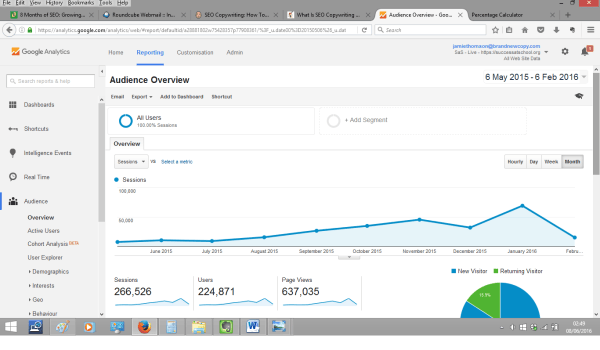
Google Analytics and Search Engine Optimisation: How to Use Data to Improve SEO
Google Analytics can help you understand what people do after they arrive on your website from search engines. While it does not directly improve rankings or show every search query, it can reveal which organic landing pages attract visitors, how those visitors engage with your content and where there may be opportunities to improve.
Used alongside Google Search Console, Google Analytics 4 (GA4) can form a useful part of a practical search engine optimisation (SEO) workflow.
What Google Analytics can—and cannot—tell you about SEO
GA4 measures activity on your website. It can show how visitors arrived, which pages they viewed, whether they completed important actions and how their behaviour differed by traffic source.
However, GA4 is not a keyword-ranking tool. It generally does not provide a complete list of the exact Google searches that brought people to your site. For search queries, impressions and average positions, use Google Search Console. Linking Search Console with GA4 lets you examine search performance alongside on-site activity, although the two platforms use different data and reporting methods.
It is also important to remember that organic traffic data has limitations. Consent choices, browser settings, tracking configuration and reporting thresholds can affect what appears in Analytics. Treat the figures as useful indicators rather than a perfect record of every visit.
Set up GA4 to measure organic traffic
Before using Analytics to assess SEO, check that GA4 is collecting data correctly:
- Install the GA4 tag. Add the Google tag to your site, or configure it through Google Tag Manager. Check that it is not firing more than once per page.
- Verify tracking. Use GA4’s Realtime report or DebugView to confirm that visits and events are being recorded.
- Set up key events. Mark meaningful actions—such as a purchase, enquiry submission or sign-up—as key events. Avoid treating every page view as a conversion.
- Link Google Search Console. In GA4’s product links area, connect the relevant Search Console property. You will need the appropriate permissions in both products. Search Console reports may take time to appear and are not available for every GA4 report.
- Check consent and privacy settings. Ensure your analytics setup follows applicable privacy requirements and accurately reflects users’ consent choices.
Find and assess organic search traffic
In GA4, organic search traffic is usually grouped under the Organic Search channel. The Traffic acquisition report can help you review sessions by channel and source. You can also explore landing pages to see which pages users enter through.
When reviewing SEO performance, consider several measures together:
- Organic sessions: Visits attributed to organic search. Compare trends over time, taking seasonality and changes to your site into account.
- Landing pages: The first pages visited in a session. These can show which articles, product pages or service pages are attracting search visitors.
- Engagement rate and engaged sessions: Indicators of whether visitors interacted with your site. They need context: a short visit may be perfectly successful if the visitor quickly finds a phone number or opening time.
- Key events: Actions that matter to your organisation, such as purchases, leads or registrations. These help you judge whether traffic is achieving a useful outcome.
- Revenue or lead quality: Where suitable tracking is in place, assess the value of organic visits rather than focusing only on traffic volume.
A high number of sessions is not automatically a sign of strong SEO. A smaller amount of relevant traffic that generates enquiries or sales may be more valuable than a large number of visits with little purpose.
Combine Analytics with Search Console
Search Console and GA4 answer different questions:
- Search Console: How often your pages appeared in Google Search, which queries generated impressions and clicks, and how your pages performed in search results.
- Google Analytics: What visitors did on your site after arriving, including which pages they viewed and whether they completed key actions.
For example, Search Console might show that a page receives many impressions but relatively few clicks. That could prompt a review of its title link and description in search results, as well as its relevance to the queries shown. GA4 can then help you assess whether the visitors who do arrive engage with the page or take the next step.
Do not expect the totals in the two platforms to match exactly. They measure different things, use different attribution and processing methods, and can be affected by privacy controls and data availability.
A practical SEO analysis workflow
- Choose a time period. Compare like with like, such as the same month last year, and account for seasonal demand or major site changes.
- Identify important landing pages. Use GA4 to find pages receiving organic visits and check whether they support your business or publishing goals.
- Check search visibility. Review those pages in Search Console for queries, impressions, clicks and average position.
- Look for mismatches. High impressions with low clicks may suggest a search-result presentation or relevance issue. Organic visits without meaningful engagement may point to a mismatch between the searcher’s expectations and the page.
- Review the page itself. Check that it answers the visitor’s question, is easy to read, works well on mobile and offers a clear next step where appropriate.
- Make one or more focused changes. Update content, improve internal links, clarify headings or refine the page’s title and description where needed.
- Measure the result. Allow time for search engines to recrawl and reassess the page, then compare search visibility, organic visits and key events. Avoid attributing every change to a single edit.
Use landing-page data to improve content
Organic landing-page reports can help you decide where to focus your content efforts. Pages with growing traffic may be good candidates for an update, while pages with declining visits may need a closer review of their usefulness, accuracy, search visibility or technical health.
Use the data to ask practical questions:
- Does the page answer the question a visitor is likely to have?
- Is the most important information easy to find?
- Does the page provide a clear route to a related article, product or service?
- Are visitors completing the action the page is intended to support?
- Is the content current, accurate and distinct from other pages on the site?
Analytics can point towards a possible issue, but it cannot explain the reason on its own. Combine its reports with Search Console, user feedback, technical checks and a review of the page’s content.
Common mistakes to avoid
- Assuming Analytics measures rankings. Use Search Console or a dedicated rank-tracking service for visibility and ranking analysis.
- Judging a page by bounce rate alone. GA4’s engagement measures need to be interpreted in context; a quick visit is not always a bad experience.
- Chasing traffic without considering intent. More visitors are useful only when they are relevant to your goals.
- Making decisions from very small samples. A handful of visits can produce misleading patterns. Look for sustained trends and consider the volume of data.
- Ignoring tracking quality. Incorrect tags, duplicate events or missing consent configuration can make reports unreliable.
- Expecting immediate results. SEO changes can take time to be crawled, indexed and reflected in search performance.
Conclusion
Google Analytics is most useful for SEO when it is used to understand what happens after a person reaches your website. It can help you identify valuable organic landing pages, assess engagement and measure meaningful outcomes. Google Search Console complements it by showing how pages perform in Google Search.
Together, these tools can support better-informed decisions about content and site improvements. Focus on reliable tracking, relevant visitors and useful outcomes—not traffic figures alone.
21 Frequently Asked Questions About Using Google Analytics for Search Engine Optimisation
- How do I optimize my website with Google Analytics?
- How do I optimize my website using Google Analytics?
- Does Google Analytics 4 affect SEO?
- What is SEO in Google Analytics?
- How do I use Google search engine optimization?
- Is Google Analytics enough for SEO?
- How do I use Google Analytics for SEO writing?
- Is SEO and Google Analytics same?
- Does Google Analytics have a SEO tool?
- Is Google Analytics search engine optimization?
- What is Search Engine Optimization analysis?
- What is the difference between SEO and Google Analytics?
- Can you use Google Analytics for SEO?
- How do I optimize Google search engine?
- What is SEO in Analytics?
- How do I see SEO in Google Analytics?
- What is Google search engine optimization?
- Why should I use Google Analytics for SEO?
- What is the difference between Google Analytics and SEO?
- How do I improve Google search engine optimization?
- Can Google Analytics be used for SEO?
How do I optimize my website with Google Analytics?
To optimise your website with Google Analytics, use GA4 to identify which organic landing pages attract visitors, how people engage with them and whether they complete important actions, such as making a purchase or submitting an enquiry. Look for pages with declining traffic or visits but few meaningful outcomes, then review their content, usability and calls to action. Pair these insights with Google Search Console data, which shows search queries, impressions and clicks, and make focused improvements before monitoring the results over time. Google Analytics can guide your decisions, but it does not directly improve rankings or replace useful, relevant content and sound technical SEO.
How do I optimize my website using Google Analytics?
Use Google Analytics to identify which organic landing pages attract visitors, how those visitors engage with your content and whether they complete valuable actions, such as making a purchase or submitting an enquiry. In GA4, review the Traffic acquisition and landing-page reports, then use Google Search Console to check the search queries, impressions and clicks behind that traffic. Look for pages with declining visits, low engagement or few conversions, and improve their content, usability, internal links or calls to action. Treat Analytics as a source of insight rather than a ranking tool, and measure results over time, as SEO changes can take a while to affect search performance.
Does Google Analytics 4 affect SEO?
No, Google Analytics 4 does not directly affect your search engine rankings. It is an analytics tool that measures activity on your website; it does not improve or harm SEO simply by being installed. GA4 can, however, help you understand how organic visitors use your site and whether they complete useful actions, giving you insights to guide content and website improvements. Use Google Search Console to monitor search queries, impressions, clicks and search visibility, as GA4 does not provide a complete picture of keyword rankings.
What is SEO in Google Analytics?
SEO in Google Analytics means analysing visits to your website that come from unpaid search engine results. In GA4, you can review organic search traffic, see which landing pages visitors arrive on, understand how they engage with your site and measure whether they complete important actions, such as making a purchase or submitting an enquiry. Analytics does not show all the search terms people used or directly report your Google rankings; use Google Search Console for search queries, impressions and clicks.
How do I use Google search engine optimization?
To use Google for search engine optimisation, start with Google Search Console to check how your pages appear in Search, which queries bring impressions and clicks, and whether Google reports any indexing or technical issues. Use Google Analytics 4 to understand what visitors do after arriving from organic search, including which pages they view and whether they complete useful actions. Together, these free tools can help you spot content that needs improving, measure results over time and make informed SEO decisions; neither tool automatically optimises your site, so use the insights to guide changes to your content and website.
Is Google Analytics enough for SEO?
No. Google Analytics is useful for understanding what visitors do after arriving on your website, including which organic landing pages they visit and whether they complete valuable actions. However, it does not provide a complete picture of search queries, impressions or rankings. For those insights, use Google Search Console alongside Analytics, and consider technical SEO tools for tasks such as site audits and backlink analysis. Together, these tools offer a more rounded view of SEO performance.
How do I use Google Analytics for SEO writing?
Use Google Analytics to discover how readers interact with your existing content, then use those insights to guide what you write next. In GA4, review the landing pages attracting organic search visitors, the engagement they generate and whether readers complete useful actions, such as signing up or making an enquiry. Combine this with Google Search Console data to see the queries and search results associated with those pages. Use the findings to identify content gaps, improve articles that attract relevant visitors but underperform, and plan material that better answers your audience’s needs. Analytics does not provide a complete list of search keywords, so treat it as one source of evidence rather than a substitute for keyword research.
Is SEO and Google Analytics same?
No, SEO and Google Analytics are not the same. Search engine optimisation (SEO) is the process of improving a website’s visibility in organic search results, while Google Analytics is a measurement tool that helps you understand how visitors use your website. Analytics can show how much traffic comes from organic search and what visitors do after they arrive, but it does not directly improve rankings. For search queries and visibility data, Google Search Console is a more suitable companion tool.
Does Google Analytics have a SEO tool?
Google Analytics does not have a dedicated SEO tool for checking rankings or researching keywords. Instead, it helps you understand what visitors do after arriving at your website, including which landing pages attract organic search traffic and whether visitors complete valuable actions. For search queries, impressions and clicks, use Google Search Console alongside Analytics to get a fuller picture of your SEO performance.
Is Google Analytics search engine optimization?
No, Google Analytics is not a search engine optimisation (SEO) tool in itself, and using it will not directly improve your search rankings. It is an analytics platform that helps you understand what visitors do after they arrive at your website, including which pages attract organic search traffic and whether visitors complete important actions. For data on Google search queries, impressions and clicks, use Google Search Console alongside Analytics.
What is Search Engine Optimization analysis?
Search Engine Optimisation (SEO) analysis is the process of assessing how well a website performs in organic search and identifying ways to improve its visibility and usefulness. It can include reviewing search rankings, impressions and clicks in Google Search Console, as well as using Google Analytics to understand what visitors do after arriving—such as which pages they view and whether they complete key actions. Together, these insights help highlight opportunities to improve content, technical performance and the visitor experience.
What is the difference between SEO and Google Analytics?
SEO (search engine optimisation) is the work of improving a website’s visibility and relevance in organic search results, while Google Analytics is a tool for measuring what visitors do after they reach your site. SEO includes activities such as creating useful content, improving site structure and resolving technical issues; Google Analytics helps you analyse traffic, engagement and actions such as enquiries or purchases. In short, SEO aims to attract relevant visitors from search engines, while Google Analytics helps you understand their behaviour and assess how well your website is performing.
Can you use Google Analytics for SEO?
Yes, you can use Google Analytics to support SEO by seeing how visitors from organic search use your website. It can show which landing pages attract organic visits, how engaged visitors are and whether they complete important actions, such as making a purchase or submitting an enquiry. However, Google Analytics does not provide a complete picture of search queries or rankings; use Google Search Console for data on impressions, clicks and search performance, then combine both tools to guide improvements.
How do I optimize Google search engine?
To optimise your visibility in Google Search, create useful, original content that clearly answers your audience’s questions, use descriptive page titles and headings, and make sure your website is fast, mobile-friendly and easy to navigate. Google Analytics can show how organic visitors behave on your site and whether they complete valuable actions, while Google Search Console provides data on search queries, impressions and clicks. Use both tools to spot opportunities, improve relevant pages and measure progress over time; remember that SEO takes time and no change can guarantee a particular ranking.
What is SEO in Analytics?
In Google Analytics, SEO (search engine optimisation) refers to analysing visits to your website that come from unpaid search results. GA4 can show how visitors arriving through organic search engage with your pages and whether they complete valuable actions, such as making a purchase or submitting an enquiry. It does not provide a complete view of search queries or rankings; use Google Search Console for data such as impressions, clicks and the searches that lead people to your site.
How do I see SEO in Google Analytics?
To see SEO performance in Google Analytics 4, open the Reports section and check Acquisition reports, particularly Traffic acquisition, where you can view visits attributed to the Organic Search channel. Use landing-page reports to see which pages organic visitors arrive on, and review engagement and key events to understand what they do next. For search queries, impressions, clicks and average position, link your Google Search Console property to GA4; Analytics alone does not provide a complete view of keyword or ranking data.
What is Google search engine optimization?
Google search engine optimisation (SEO) is the process of improving a website so that its pages are more likely to appear prominently in unpaid Google Search results. It involves creating useful, relevant content, making pages easy for search engines to crawl and understand, improving the user experience and earning trustworthy links from other websites. Google Analytics can help you assess what organic search visitors do after arriving on your site, while Google Search Console provides information about search queries, impressions and clicks.
Why should I use Google Analytics for SEO?
Google Analytics helps you understand what visitors do after arriving at your website from organic search. You can see which landing pages attract visitors, how they engage with your content and whether they complete valuable actions, such as making a purchase or submitting an enquiry. These insights can help you identify strong-performing pages and areas to improve. For search queries, impressions and clicks, use Google Search Console alongside Analytics, as GA4 does not provide a complete picture of how your site appears in search results.
What is the difference between Google Analytics and SEO?
Google Analytics and search engine optimisation (SEO) serve different purposes: SEO is the process of improving a website’s visibility in unpaid search results, while Google Analytics measures what visitors do after they arrive. SEO can help attract relevant organic traffic; Google Analytics can show how much of that traffic reaches your site, which pages visitors view and whether they complete useful actions, such as making a purchase or sending an enquiry. In short, SEO helps bring people to your website, while Google Analytics helps you understand their visits.
How do I improve Google search engine optimization?
To improve your Google search engine optimisation, create helpful, original content that answers what your audience is looking for, use clear page titles and headings, and make sure your website is fast, mobile-friendly and easy for search engines to crawl. Use Google Search Console to monitor search queries, impressions and clicks, and Google Analytics to understand what visitors do after they arrive. These tools provide insights rather than directly improving rankings, so use the data to guide regular, thoughtful improvements to your content and website.
Can Google Analytics be used for SEO?
Yes, Google Analytics can support SEO by showing what visitors do after arriving from organic search, including which landing pages they visit, how they engage and whether they complete key actions such as making a purchase or submitting an enquiry. It does not provide a complete picture of search queries or rankings, so use Google Search Console alongside it to review impressions, clicks and search terms. Together, these tools help you understand both how people find your site and what they do once they arrive.